

Concerned about WordPress security? 5 Risks That Webflow Migration Can Solve

Have you ever found yourself with a backlog of WordPress site update notifications, or felt anxious after seeing news about plugin vulnerabilities?
While WordPress is the most widely used CMS in the world, its large market share also makes it a frequent target for attacks. In fact, many web application attacks targeting CMS platforms are said to be concentrated on WordPress.
This article will outline the security risks associated with WordPress and specifically explain how each of them can be resolved by migrating to Webflow.
Where Do WordPress Security Risks Lie?
The security issues with WordPress do not stem from the core WordPress software being of low quality. The essence of the problem lies in the "excessively broad scope of self-management" required.
While the core WordPress development team promptly provides security patches, the actual risks lurk in its periphery. Vulnerabilities in tens of thousands of third-party plugins, PHP version management on rental servers, database backup systems, and measures against unauthorized logins to the admin screen—all of these must be continuously and properly managed by the site operator themselves.
For small and medium-sized businesses, it's common not to have a dedicated IT staff, and it's not unusual for "a plugin whose updates were postponed to become an entry point for an attack."
5 Security Risks That Can Be Solved by Migrating to Webflow
1. Plugin Vulnerability Risk → Plugin-Free Design
In WordPress, many functions such as forms, SEO, caching, and security rely on plugins. The more plugins you have, the larger the attack surface for vulnerabilities becomes.
In Webflow, forms, CMS, hosting, SSL, and CDN are all integrated into the platform. Because of its design, which does not rely on third-party plugins, plugin-induced vulnerability risks are structurally eliminated.
2. Server Management Responsibility → Managed Hosting
With WordPress, you need to manage PHP version control, web server settings, firewall implementation, and SSL certificate renewals yourself.
Webflow provides managed hosting powered by AWS infrastructure and Cloudflare CDN,with server security patch application and DDoS protectionall handled automatically.
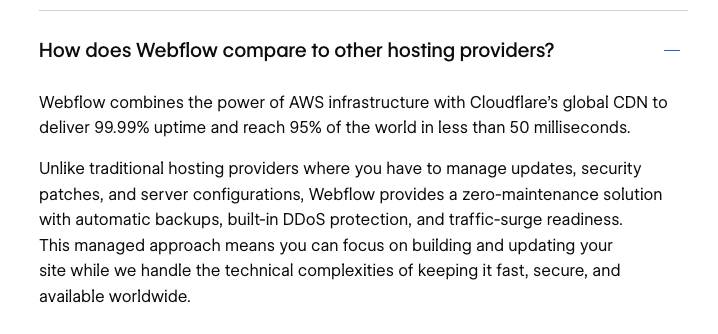
Image source:https://webflow.com/feature/hosting
3. Unauthorized Access to Admin Panel → 2FA + RBAC
WordPress's /wp-admin is a widely known login URL and is susceptible to brute-force attacks. Countermeasures require implementing security plugins or changing the URL, which again falls within the scope of self-management.
Webflow offers two-factor authentication (2FA) for all accounts. Furthermore,custom role-based access control (RBAC)allows you to finely restrict which pages and content each editor can access.
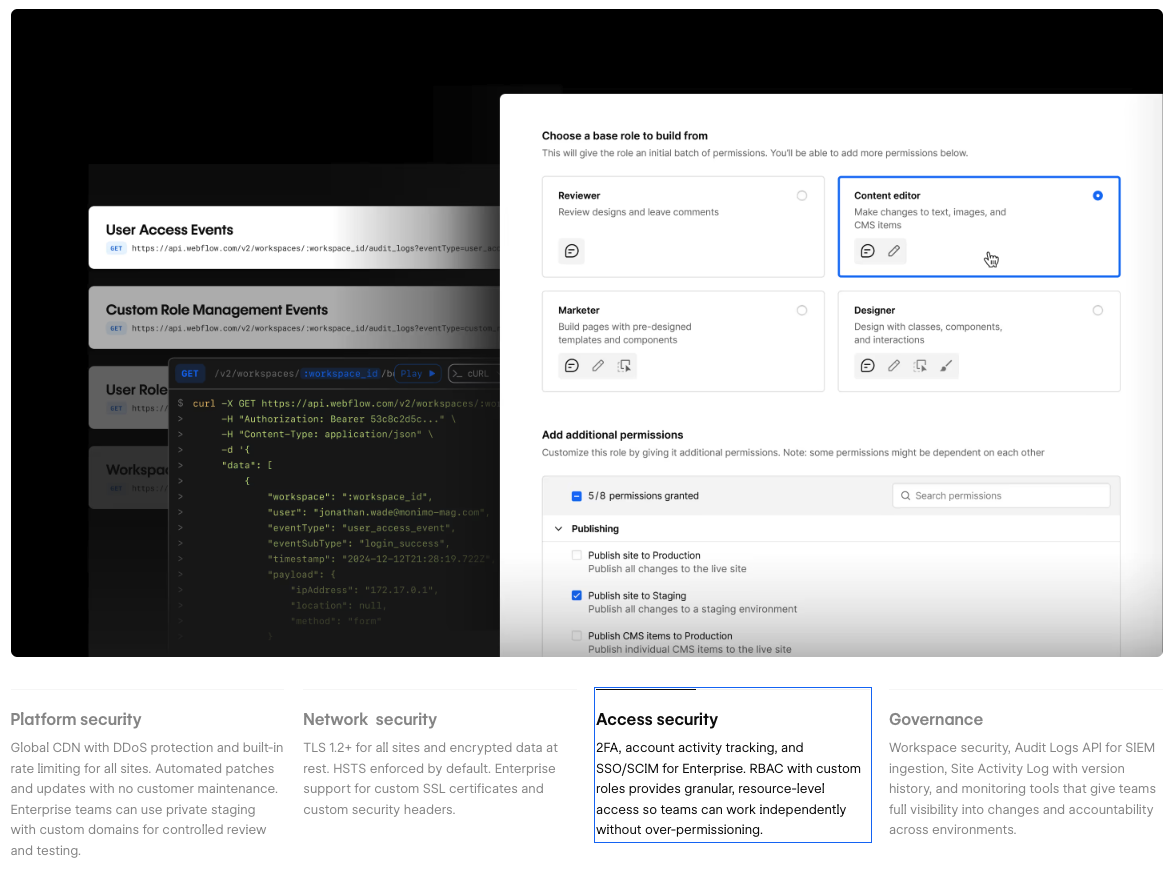
Image source:https://webflow.com/security
4. Inadequate Backup System → Automatic Backups
WordPress backups rely on plugins or server functions, which often leads to problems like "I didn't take a backup" or "I don't know how to restore it."
In Webflow,automatic backupsare a standard feature, allowing you to restore to a previous state with a single click from the admin panel. The risk of failing to take a backup simply doesn't exist.
5. Responding to Security Audits → Certification Evidence
When responding to ISMS audits or security checklists, with WordPress, you need to individually explain the security of each plugin you use and the server's security posture.
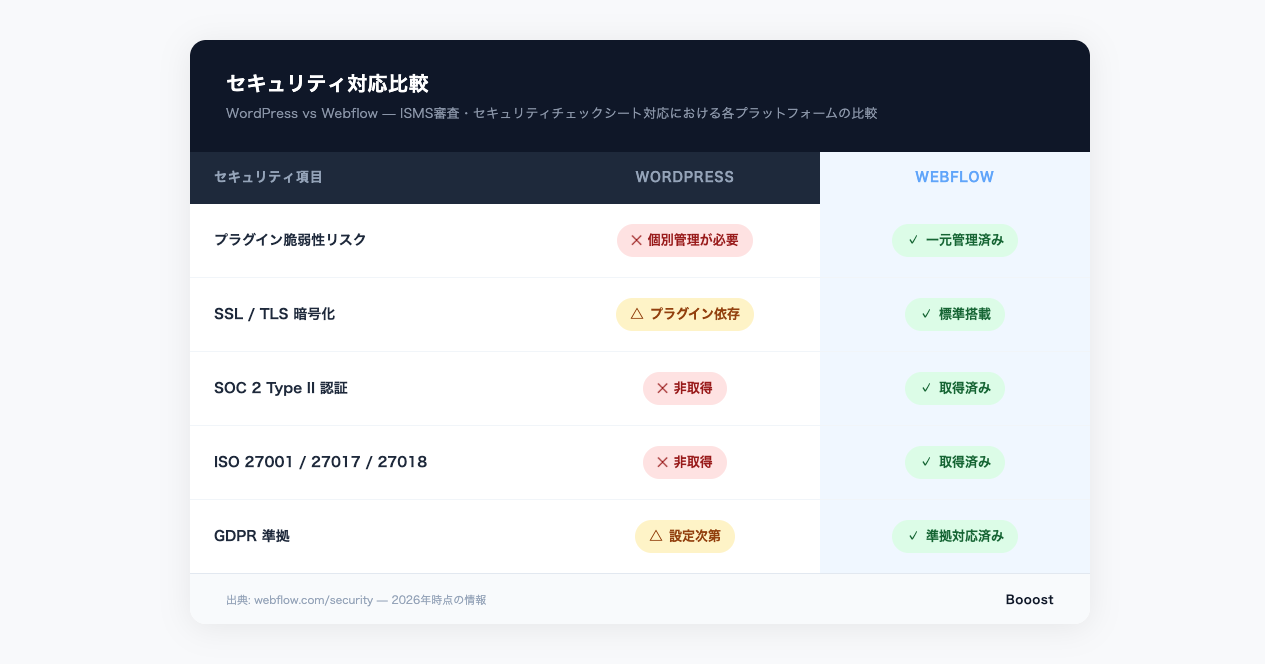
Webflow holds security certifications such as SOC 2 Type II and ISO 27001/27017/27018, and is also GDPR compliant. By simply submitting these certifications as evidence, platform-level security explanations are complete.
How to Maintain SEO Rankings During Migration
Beyond security,there are various signs that indicate the limitations of WordPress operation.However, when considering a Webflow migration, many people are concerned about its impact on SEO. To put it simply, if proper redirect planning is implemented, your SEO rankings will be carried over as they are.
At Booost, we conduct a comprehensive inventory of all URLs before migration and meticulously set up 301 redirects. Since Webflow's structure tends to result in high Core Web Vitals scores, SEO rankings often improve in terms of page speed after migration. We monitor access conditions before and after migration and respond immediately if any issues arise.
Summary
The essence of WordPress's security problems lies in the excessively broad scope of self-management. Migrating to Webflow is an option that fundamentally resolves this structural challenge.
- Expanded attack surface due to plugin dependency → Plugin-free integrated design
- Server management burden → AWS + Cloudflare managed hosting
- Unauthorized access to admin panel → 2FA + RBAC
- Missed backups → Automatic backups as standard
- Complexity of security audit response → Evidence submission via SOC 2 / ISO certifications
At Booost, we support migration from WordPress to Webflow from three perspectives: security, SEO, and design. Even if you're concerned about security but don't know where to start, please feel free to contact us.
Booost is a web development service specializing in the no-code tool "Webflow."
We maximize your website's customer acquisition power through three optimizations: design, marketing, and translation.

