

How to Upload llms.txt in Webflow to Help AI Understand Your Content Correctly

As AI assistants like ChatGPT and Gemini become primary tools for people to gather information, have you considered how your site's content is understood by AI? While search engine optimization (SEO) is already common, optimizing for LLMs (Large Language Models) is still an unfamiliar territory for many site operators. On July 23, 2025, Webflow responded to this challenge by supporting a new feature: "llms.txt file upload." This is a crucial step for AI to accurately understand your site.
Why AI Content Optimization is Essential Now
Traditional SEO targeted search engine crawlers, aiming to improve rankings through proper HTML structure and metadata. However, in recent years, there's been a surge in users directly asking ChatGPT or Perplexity instead of searching on Google. When these AI assistants gather and present information, they don't directly read a webpage's HTML; instead, they utilize content they've learned and referenced as an LLM.
The problem has been the lack of means for site operators to control how LLMs understand their site's content. The more content a site has, the higher the risk of an LLM misunderstanding content priorities or context. This has sometimes led AI assistants to provide users with inaccurate information or interpretations that differ from the original intent. Note that Webflow offers multiple SEO-related settings,Per-page SEO control featurescan be combined to build a more comprehensive SEO strategy.
【画像】Suggested image: Screenshot - Conceptual diagram showing the difference in how search engine crawlers and LLMs read websites
What is llms.txt, and how does it differ from robots.txt and sitemaps?
llms.txt is a plain text file specifically designed for LLMs. By explaining your site's content structure, important topics, and the role of each page to an LLM, it guides AI to understand your content more accurately.
Similar files like "robots.txt" and "sitemap.xml" exist on the web, but their roles are fundamentally different. robots.txt is a file for controlling search engine crawler access, and sitemap.xml is for communicating a list of site pages. In contrast, llms.txt aims to convey the meaning and context of content to LLMs; it might be best described as a "content instruction manual for LLMs."
What You Can Achieve with llms.txt
The main benefit of implementing llms.txt is improved accuracy in content interpretation. By communicating to the LLM which sections are written with what intent, AI assistants can more easily present information aligned with your intentions when answering user questions.
Furthermore, you can prioritize the most important content on your site for LLMs to recognize. Even for sites with a vast number of pages, llms.txt allows you to explicitly state what should be treated as core information. Additionally, you can expect improved summarization accuracy. When an LLM summarizes content, it becomes easier for it to generate summaries that more accurately reflect the original message and main points.
How to Set Up llms.txt in Webflow
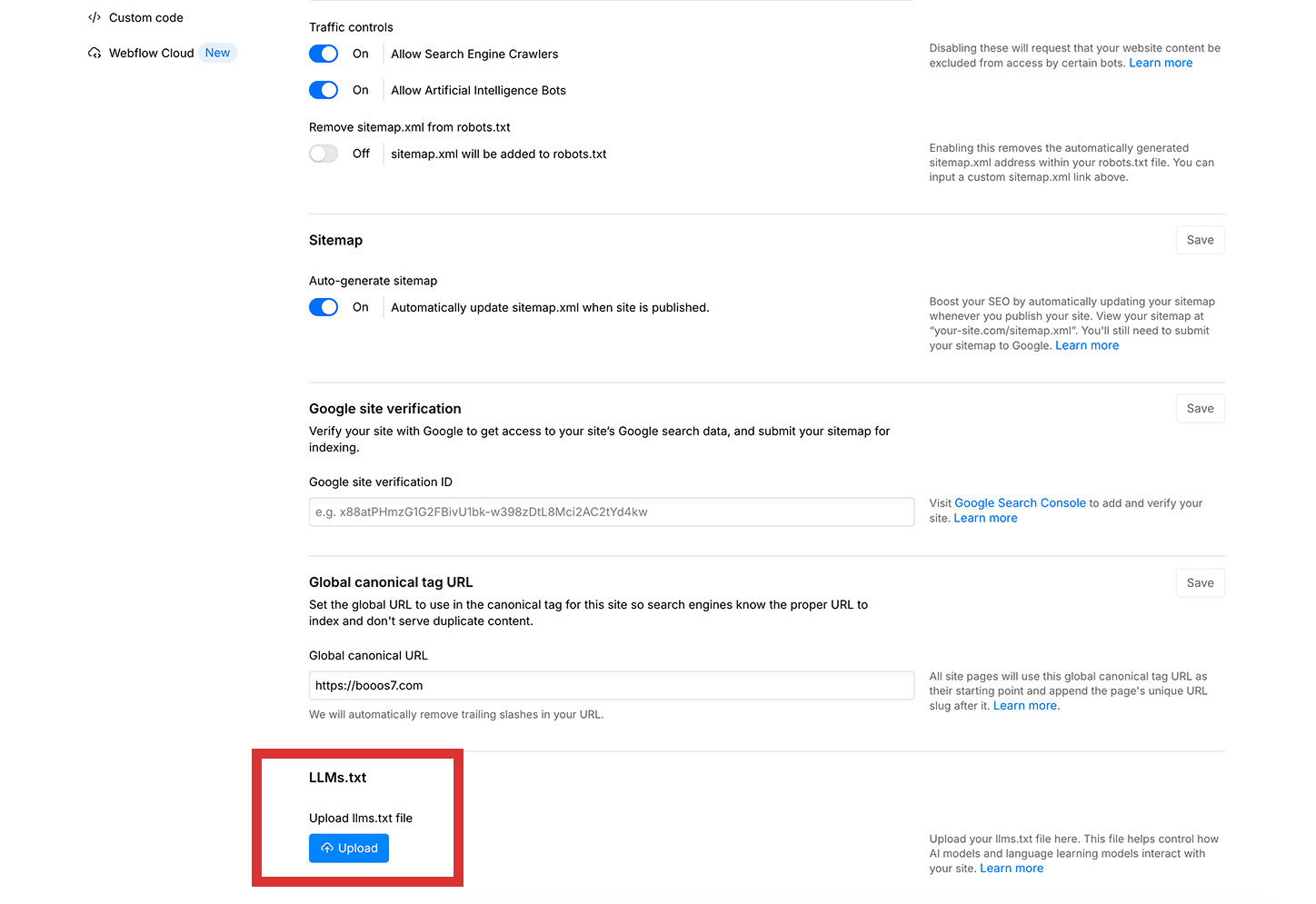
Webflow has added a new option that allows you to directly upload an llms.txt file within your site's "SEO Settings" section. There's no need for direct server access or complex technical configurations; the entire process can be completed from the Webflow dashboard. The same SEO settings area also includes OGP image settings, andthe ability to use existing assets for OG imagesit's a good idea to set these up together.
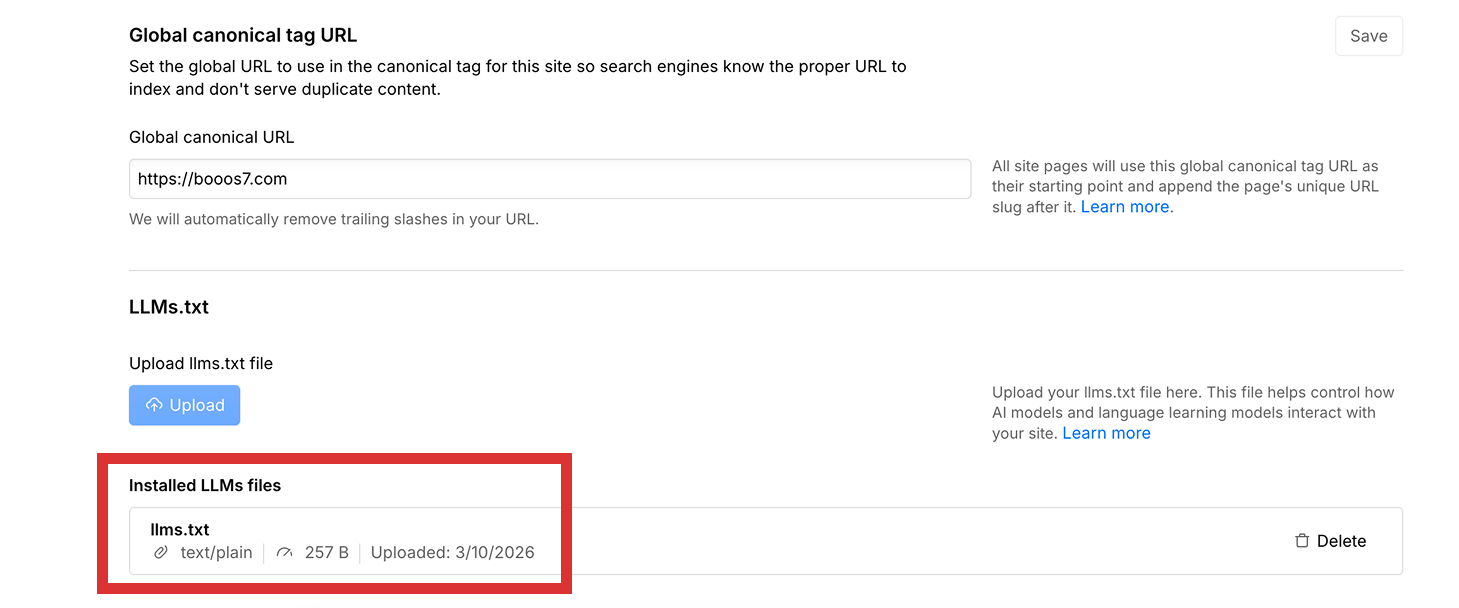
The uploaded llms.txt file is automatically placed by Webflow in your domain's root directory (https://yourdomain.com/llms.txt). This is where LLMs typically reference the file. Furthermore, Webflow properly handles uploaded llms.txt files to prevent them from being indexed by search engines, ensuring that the file's content does not inadvertently appear in search results.
Leveraging llms.txt as an AI-Era Content Strategy
Utilizing llms.txt is particularly effective for sites with a large volume of content or those providing highly specialized information. For instance, on sites with numerous blog posts, product pages, or service descriptions, it can be challenging for LLMs to determine what to prioritize. In such cases, explicit guidance via llms.txt is highly beneficial.
When creating an llms.txt file, it's recommended to include core topics of your service, your most important landing pages, and correct interpretations of specialized terminology. Since the structure is written in plain text, no knowledge of complex formats like HTML or JSON is required. Sample formats are available in the official documentation, allowing even first-time creators to prepare it relatively smoothly by referring to them.
Furthermore, llms.txt isn't a one-time setup; it should be reviewed and updated whenever your site's content changes to continuously provide LLMs with the latest information. Just like SEO metadata, ongoing maintenance is crucial.
Summary
In an era where AI assistants are becoming central to information gathering, ensuring LLMs accurately understand your content is a new form of SEO. Webflow's llms.txt upload feature provides a way to achieve this crucial optimization while lowering the technical barrier. If you manage a content-rich site or are focused on acquiring traffic via AI, we encourage you to consider utilizing this feature. Before publishing, we recommendreferring to the pre-launch checklistto ensure your overall SEO settings are in order. As an AI-era content strategy, support for llms.txt will only grow in importance.
Booost is a web development service specializing in the no-code tool "Webflow."
We maximize your website's customer acquisition power through three optimizations: design, marketing, and translation.

