

[Important] To Webflow Users: Consumption Tax will be applied starting February 20, 2025! Here's how to prepare.

We received an important email from Webflow regarding Japanese Consumption Tax (JCT). Previously, Webflow usage fees did not include consumption tax, but starting February 20, 2025, JCT will be applied to residents of Japan.

English
Hi Daisuke,
We’re reaching out with an update related to Japanese Consumption Tax (JCT).
What’s changing
We've recently upgraded our systems to ensure compliance with JCT regulations. As a result, if you're a Webflow subscriber in Japan without a Japan Tax Registration Number (TRN), JCT will be applied to your purchases and subscriptions starting as early as February 20, 2025. For more detailed information, please check out our Webflow Help Center article about sales tax on subscriptions.
Next steps
To ensure accurate billing and to avoid unnecessary JCT charges, please add your TRN and confirm your billing information and address in your account settings. For more information on how to add or update this information, please read our Webflow Help Center article.
Without a valid TRN saved in your account settings, Webflow will be required to charge JCT on your purchases and subscriptions. If you’ve already added your TRN, no further action is required.
Thank you for being a part of the Webflow community,
The Webflow team
Japanese
Hello,
We're providing an update regarding Japanese Consumption Tax (JCT).
What's changing
We've recently upgraded our systems to ensure compliance with JCT regulations. As a result, if you're a Webflow subscriber in Japan without a Japan Tax Registration Number (TRN), JCT will be applied to your purchases and subscriptions starting as early as February 20, 2025. For more detailed information, please check out our Webflow Help Center article about sales tax on subscriptions.
Next steps
To ensure accurate billing and to avoid unnecessary JCT charges, please add your TRN and confirm your billing information and address in your account settings. For more information on how to add or update this information, please read our Webflow Help Center article.
Without a valid TRN saved in your account settings, Webflow will be required to charge JCT on your purchases and subscriptions. If you’ve already added your TRN, no further action is required.
Thank you for being a part of the Webflow community,
The Webflow team
This article provides a clear summary of the email's content and explains the necessary actions you should take.
Why is consumption tax being applied?
According to the email, Webflow has upgraded its systems to comply with Japanese consumption tax regulations. This means consumption tax will now be applied to Webflow users within Japan.
Who will be affected?
This change will affect anyone who meets either of the following criteria:
- Webflow users residing in Japan.
- Those who have not registered their Japan Tax Registration Number (TRN) in their Webflow account.
In other words, if you are an individual user, or a corporation/sole proprietor who has not registered your TRN, consumption tax will be applied.
What exactly will change?
Starting February 20, 2025, if you have not registered your Japan Tax Registration Number (TRN), Japanese consumption tax (10%) will be added to your Webflow purchases and subscription fees.
How can you avoid being charged consumption tax?
If you are a corporation or sole proprietor with a Japan Tax Registration Number (TRN), you can avoid being charged consumption tax by registering it in your Webflow account settings.
What is a Tax Registration Number (TRN)?
- For corporations: Corporate Number
- For sole proprietors: Invoice Registration Number
How to set up your Tax Registration Number (TRN)
Here are the steps to set up your Tax Registration Number in your Webflow account:
1) Log in to Webflow
2) Click the account menu in the top right corner of the screen

3) Select "Workspaces"
4) Select the workspace where you want to set your Tax Registration Number
5) Select the "Billing" tab at the top of the screen

6) Locate the "Additional billing info" section
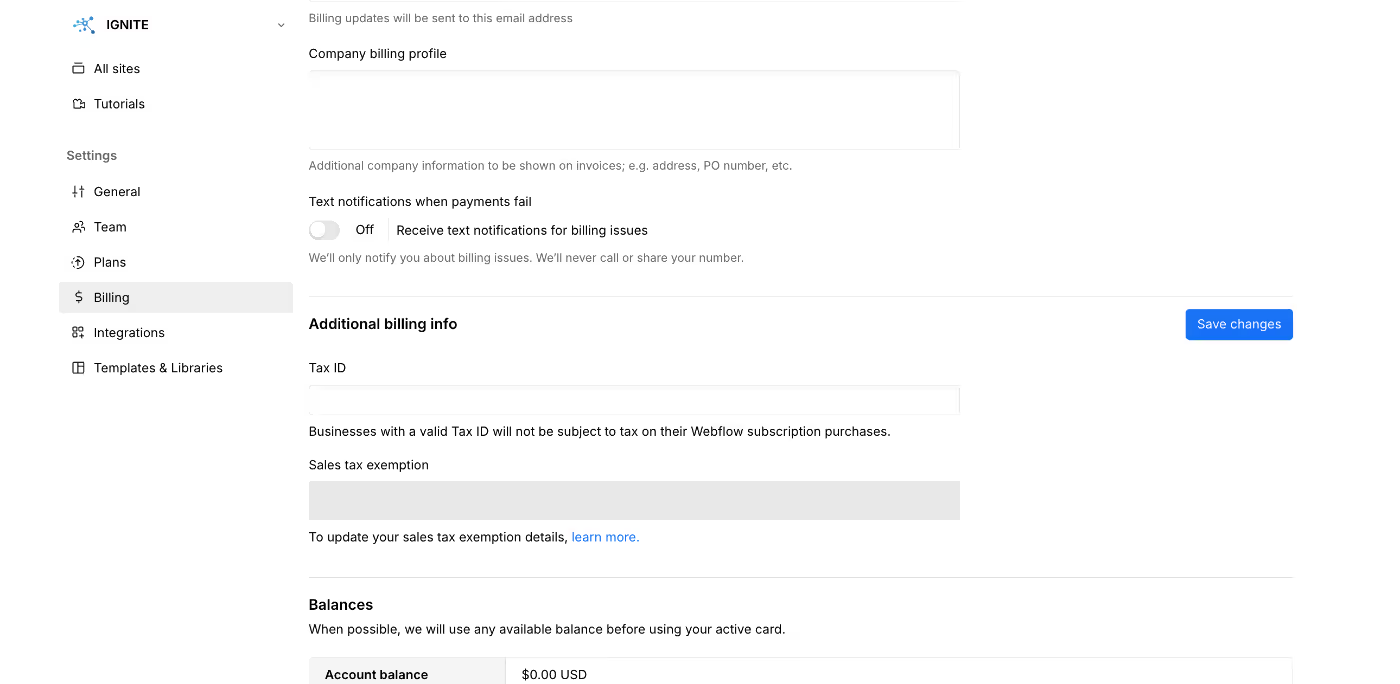
7) Enter your Tax Registration Number in the "Tax ID" or "Japan Tax Registration Number (TRN)" field

8) Click the "Save changes" or "Update" button to save
More detailed instructions can be found via the link to the Help Center article included in the email from Webflow.
Important points
- For individual users, as there is no Tax Registration Number, it is highly likely that consumption tax will be applied.
- By registering your Tax Registration Number, transactions with Webflow will be treated as business-to-business (B2B) transactions, making them exempt from consumption tax (or eligible for input tax credit).
- It is highly likely that invoices issued by Webflow comply with Japan's invoice system, but please confirm this yourself to be sure.
Summary
This change is an important step for Webflow to comply with Japanese tax law. Corporations and sole proprietors should remember to register their Tax Registration Numbers to avoid unnecessary consumption tax payments.
If you haven't registered your Tax Registration Number yet, we recommend completing the setup by February 20, 2025.
We hope this information is helpful to all Webflow users. If you have any questions, we recommend contacting Webflow support.
Booost is a web development service specializing in the no-code tool "Webflow."
We maximize your website's customer acquisition power through three optimizations: design, marketing, and translation.

